

Building a Smart Home Assistant with MCP: A Practical Guide to Home Automation

grabs popcorn and sits on the couch
– Hey Siri: turn off living room lights and open Netflix
In the rapidly evolving landscape of generative AI, the Model-Context-Protocol (MCP) framework is emerging as a game-changer. This article will guide you through building your own simple smart home assistant that can understand natural language commands and control your devices seamlessly. Full code at https://github.com/caladoxd/home-control.
Why MCP?
MCP represents a paradigm shift in how we interact with systems. Unlike traditional home automation systems that require specific commands or complex integrations, MCP allows us to create a more natural, conversational interface with anything, with the AI choosing what to do based on our requests. Think of it as having a personal butler who understands your needs and can control your entire home ecosystem.
MCP also allows rapid expansion of the system, by integrating already existing servers into it (like we did with BrowserMCP).
What makes MCP particularly powerful for our use case is its ability to:
Handle complex, multi-step commands
Maintain context across conversations
Provide natural, human-like responses
Scale to include new servers and capabilities
The Architecture
Our smart home assistant consists of four main components:
MCP API client: The brain of our system, powered by Google's Gemini AI
Tuya Server: Handles communication with Tuya smart devices (cost effective)
BrowserMCP for automated interactions with the web browser
iPhone: Uses the Shortcuts app to send voice commands to the assistant
This modular architecture allows us to:
Process natural language commands
Control smart devices
Interact with web services
Scale the system easily: add more devices and more services
Getting Started
To build your own MCP-powered smart home:
Set up the basic infrastructure:
Install required dependencies
Configure your environment variables
Set up your Tuya account
Implement the core components:
MCP client with Gemini AI
Tuya server for device control
Browser MCP for web interactions
Configure your devices:
Add device mappings
Set up aliases
Test basic commands
Building the Assistant
Let's break down the key components and how to set them up:
1. The custom MCP Client / MCP API:
app = FastAPI(lifespan=lifespan)
@app.post("/")
async def process_command(request: CommandRequest):
    """Process a natural language command"""
    try:
        conversation_history = []
        logger.info(f"Processing command: {request.command}")

        # Store device mappings if we get them
        device_mappings = None
        results = []
        command_count = 0
        MAX_COMMANDS = 10  # Safety limit

        while command_count < MAX_COMMANDS:
            # Get tool call from Gemini
            gemini_result = ask_gemini_for_tool(
                request.command,
                tools,
                device_mappings,
                command_count,
                conversation_history
            )
            logger.info(f"Command {command_count}: {gemini_result}")

            if not gemini_result or "tool" not in gemini_result or "arguments" not in gemini_result:
                break

            tool_name = gemini_result["tool"]
            arguments = gemini_result["arguments"]
            mcp_result = await call_mcp_tool(tool_name, arguments)

            # Add tool call and its result to conversation history
            conversation_history.append({
                "role": "assistant",
                "content": {"tool": tool_name, "arguments": arguments}
            })
            conversation_history.append({
                "role": "system",
                "content": mcp_result
            })

            results.append(mcp_result)
            command_count += 1

            # If we've hit the command limit or received done,break
            if command_count >= MAX_COMMANDS or tool_name =="done":
                break

        # Return the last result
        return
          {
                "status": "success",
              "message": json.loads(results[-1])["arguments"]["message"]
          }
        if results else
          {
                "status": "error",
              "message": "No results"
          }

    except Exception as e:
        logger.error(f"Error processing command: {str(e)}")
        raise HTTPException(status_code=500, detail=str(e))

if __name__ == "__main__":
    uvicorn.run(app, host="0.0.0.0", port=int(PORT))
To control the system by voice, we need to build a custom MCP client with an API endpoint that receives commands and uses Google Gemini AI to control everything. It can:
Interpret complex requests
Handle multiple commands in a single request
Maintain conversation context
Provide natural responses
The lifespan function reads a JSON with MCP server configuration, just like Cursor console does, using async stack to instantiate multiple servers in the same session and adding the tools to a list that's passed to the agent.
@asynccontextmanager
async def lifespan(app: FastAPI):
    """Lifespan context manager for FastAPI app"""

    # Startup
    logger.info("Starting application lifespan...")
    async with contextlib.AsyncExitStack() as stack:
        # First create all stdio clients
        stdio_pairs = {}

        for name, params in server_params.items():
            stdio_client_ctx = stdio_client(StdioServerParameters(**params))
            stdio_pairs[name] = await stack.enter_async_context(stdio_client_ctx)

        for name, (read, write) in stdio_pairs.items():
            session_ctx = ClientSession(read, write)
            session = await stack.enter_async_context(session_ctx)
            await session.initialize()
            server_sessions[name] = session
            tools_result = await session.list_tools()

            global tools

            # Add Tuya tools
            for tool in tools_result.tools:
                tools.append({
                    "name": f"{name}/{tool.name}",
                    "description": tool.description,
                    "inputSchema": tool.inputSchema
                })
        yield
2. Device Control
DEVICE_MAPPINGS = {
    "living room": {
        "id": "<device_id>",
        "aliases": ["dining room", "living-room"]
    },
    # ... more devices
}

 # Add Tuya tools
for tool in tools_result.tools:
        tools.append({
            "name": f"{name}/{tool.name}",
            "description": tool.description,
            "inputSchema": tool.inputSchema
        })
    yield
Our setup uses a flexible device mapping system that:
Supports multiple device names and aliases (for different languages)
Makes it easy to add new devices
Provides a natural way to reference devices
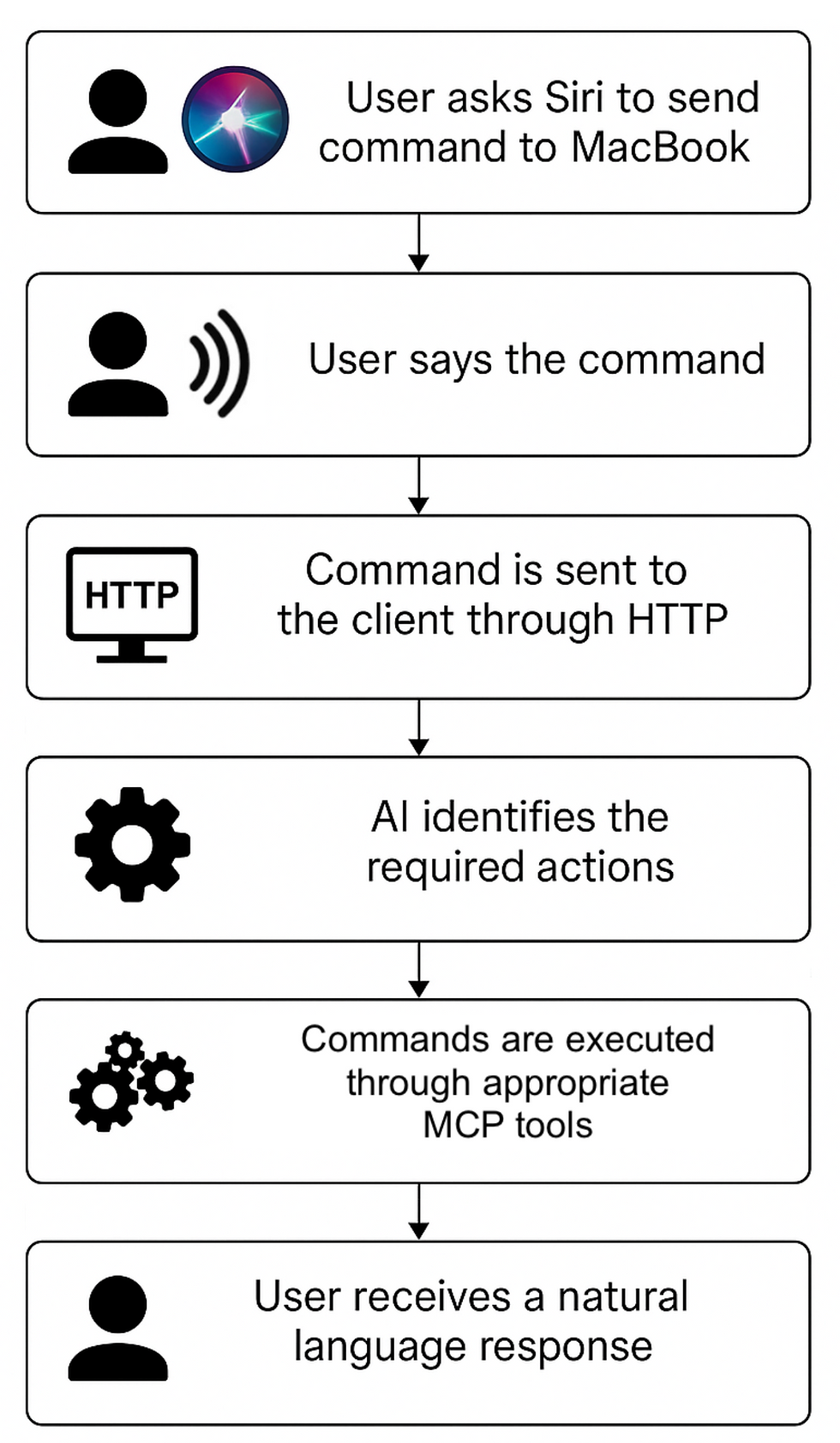
3. The command flow
The flow then looks as follows:
Real-World Examples
Here are some commands our system can handle:
"Turn on the living room lights and set them to 50% brightness"
"Turn off all lights in the bedroom"
"Open Youtube, search for pop live radio and then play the first result"
The Future of Home Automation
MCP is revolutionizing home automation by:
Making it more accessible to non-technical users
Providing a more natural interaction model
Enabling complex automation scenarios
Supporting multiple device ecosystems
Conclusion
The combination of MCP and modern AI technologies is creating a new era of home automation. By building on this framework, we can create smart homes that are not just automated but truly intelligent and responsive to our needs.The code we've explored demonstrates how to create a practical, scalable home automation system that can understand and execute complex commands while maintaining a natural, conversational interface. As MCP continues to evolve, we can expect even more sophisticated capabilities and integrations.

